---
title: "SKS: Karpenter Autoscaling Integration (Public Preview)"
date: 2025-11-11
tags: ["New","SKS","Karpenter"]
url: https://changelog.exoscale.com/sks-karpenter-autoscaling-integration-public-preview/
---
# SKS: Karpenter Autoscaling Integration (Public Preview)

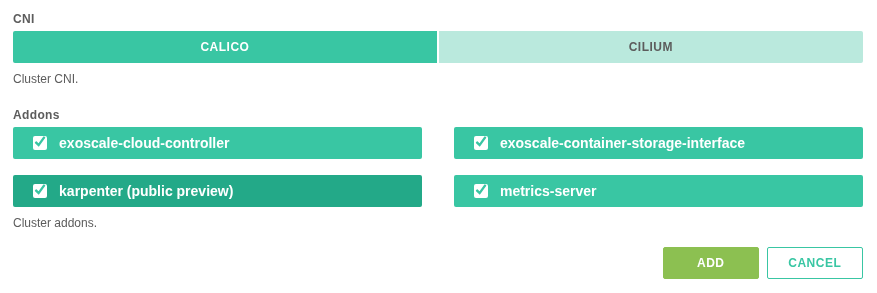
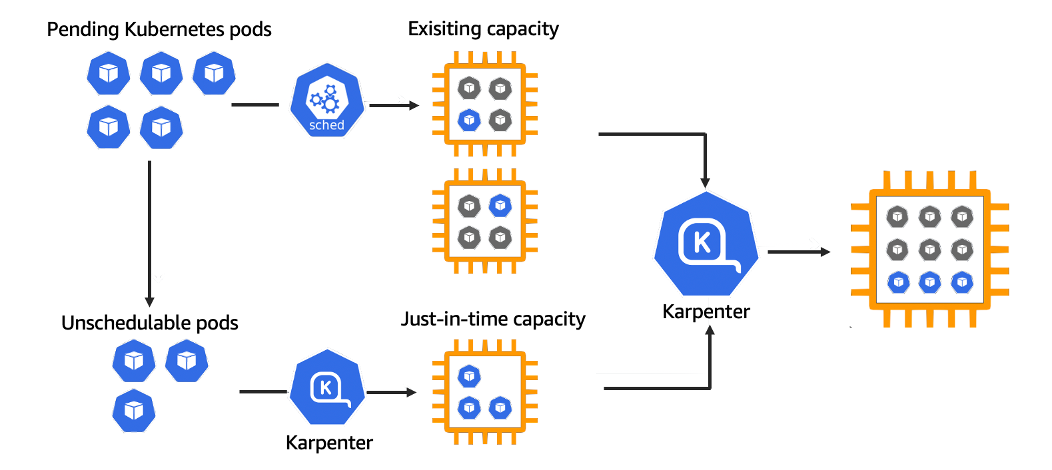
<p class=""><b>We’re bringing next-generation Kubernetes autoscaling to Exoscale, now in Public Preview.</b></p><p class="">Our new <b>Karpenter integration </b>brings advanced, real-time autoscaling to Exoscale Kubernetes clusters. It automatically provisions and removes compute or GPU nodes as demand changes, improving efficiency and reducing idle costs.</p><div class="medium-insert-images"><figure class="">
    <img src="sks-karpenter-autoscaling-integration-public-preview-image-01.png" alt="Source: Karpenter" class="" loading="lazy">
        
<figcaption>Source:<a rel="noopener nofollow" href="https://karpenter.sh/" target="_blank"> Karpenter</a></figcaption></figure></div><p class="">The integration extends Exoscale’s existing autoscaling to full node lifecycle management, delivering hyperscaler-level scalability within a sovereign European cloud. </p><p class="">Karpenter automatically selects the optimal instance type for each workload, supports GPU-based AI and ML use cases, and scales clusters down to zero when idle, so users pay only for the resources they use.</p><p class="">Based on the open source Karpenter project, this add-on is included in <a href="https://www.exoscale.com/pricing/#sks" target="_blank" rel="noopener nofollow">SKS PRO Cluster</a> at no additional cost.</p><div class="medium-insert-images"><figure class="">
    <img src="sks-karpenter-autoscaling-integration-public-preview-image-02.png" alt="Image #2" loading="lazy">
        
</figure></div><p class=""><strong style="color: rgb(28, 30, 33);"><i>Note:</i></strong><span style="color: rgb(28, 30, 33);"> Karpenter is currently in Public Preview. Some features may change before General Availability, and you may encounter bugs. If you experience any issues, please open a support ticket in the <a href="https://portal.exoscale.com/tickets" target="_blank" rel="noopener nofollow">Exoscale Portal.</a></span></p><p class="">For more details, check out our blog: <a href="https://www.exoscale.com/blog/sks-karpenter/" target="_blank" rel="noopener nofollow">https://www.exoscale.com/blog/sks-karpenter/</a> </p>

[Learn how to enable Karpenter](https://community.exoscale.com/product/compute/containers/how-to/karpenter/)